Free Delivery For the orders above 1000 AED


 COD
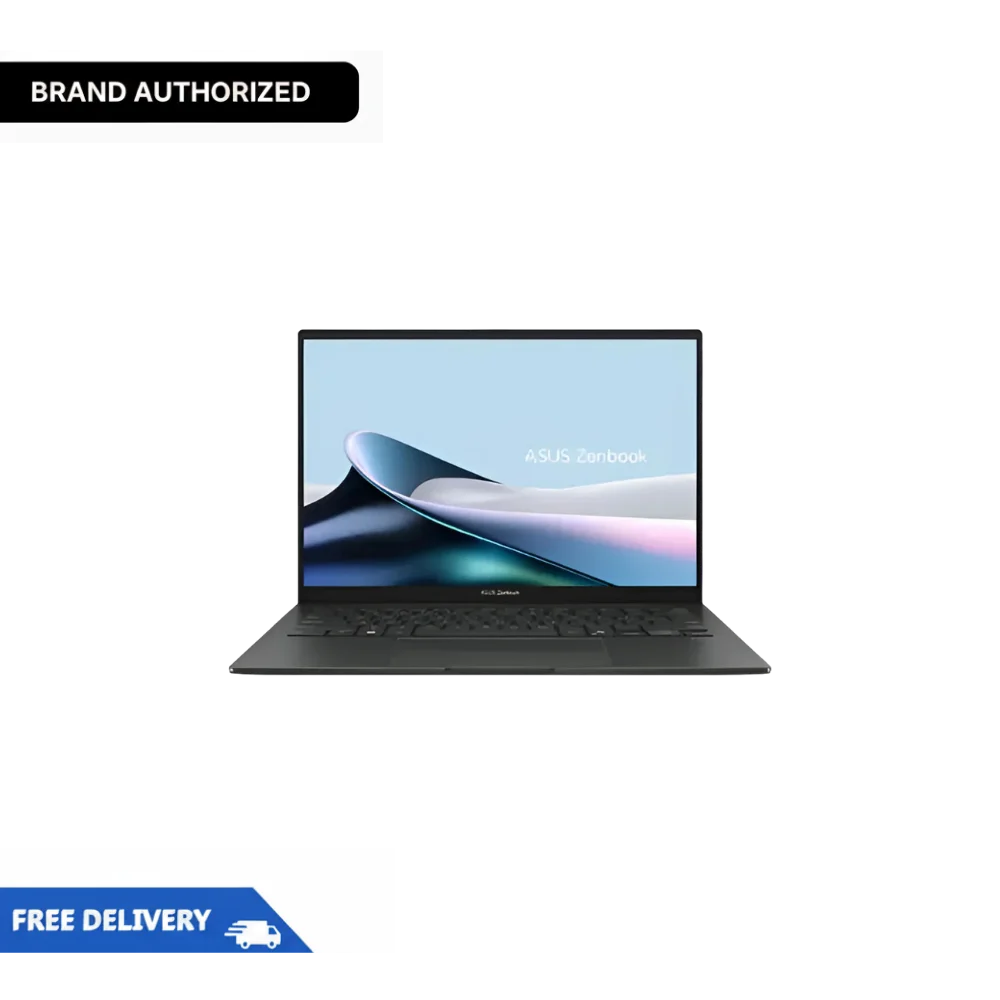
COD At Tech Point Zone, we stock the latest ASUS Zenbook 14 OLED touch variant with 16GB DDR5 RAM and 512GB SSD at competitive UAE prices. Free delivery across Dubai, Abu Dhabi, Sharjah, and all emirates.
The ASUS Zenbook 14 OLED touch screen delivers true blacks, vibrant colours, and exceptional contrast. OLED technology means each pixel produces its own light, giving you infinite contrast ratios that LCD panels simply cannot match.
The display covers 100% of the DCI-P3 colour gamut and carries Pantone validation. Photographers, designers, and video editors get accurate colour reproduction right out of the box. The 0.2ms response time keeps motion blur-free during video playback.
ASUS includes OLED Care features to prevent burn-in. Pixel Refresh and Pixel Shift work automatically in the background. After months of daily use, reviewers report no visible burn-in issues.
The higher-spec 3K (2880×1800) 120Hz variant offers sharper visuals and smoother scrolling. The base 1920×1200 60Hz model works perfectly well for everyday tasks and saves battery.
The Intel Core Ultra 7 255H processor represents Intel’s latest Arrow Lake architecture for laptops. This chip packs 16 cores with a maximum turbo speed of 5.1GHz. The hybrid architecture combines performance and efficiency cores for excellent multitasking.
The built-in NPU (Neural Processing Unit) handles AI tasks locally. Windows Copilot runs smoothly without taxing the main processor. Video calls benefit from AI-powered background blur and noise cancellation.
For creative work, the Intel Arc 140T integrated graphics handle photo editing in Lightroom and basic video work in Premiere Pro. Light gaming runs well at medium settings. Demanding 3D rendering requires a dedicated graphics card, but this laptop handles everyday creative workflows without struggle.
Real-world testing shows the Zenbook 14 OLED maintains strong performance when plugged in. On battery power, performance drops slightly to preserve battery life. Keep this in mind if you regularly edit videos away from a power outlet.
The 75Wh battery delivers genuinely impressive runtime. ASUS claims up to 15 hours of video playback. Real-world testing across multiple reviews shows 10-12 hours of mixed productivity use with brightness around 50%.
Web browsing, document editing, and video calls easily stretch through a full workday. Heavy tasks like video editing drain the battery faster, but you still get 5-6 hours of demanding work.
The USB-C fast charging adds convenience. A quick top-up during lunch restores enough power to finish the afternoon.
The all-aluminium chassis feels solid and premium. ASUS achieved MIL-STD-810H military-grade durability certification. The laptop handles daily commutes, travel, and occasional bumps without concern.
At 1.28kg and 14.9mm thin, this Zenbook slips into any laptop bag without adding weight. The compact footprint keeps desk space clear.
The Jasper Grey finish looks professional. Note that the darker colours show fingerprints more easily than lighter options. A quick wipe keeps it looking fresh.
The 180-degree lay-flat hinge adds flexibility for sharing your screen or working in tight spaces.
The backlit keyboard offers comfortable 1.4mm key travel with good tactile feedback. Reviewers consistently praise the typing experience. The keys feel snappy without being mushy or too stiff.
The ASUS NumberPad 2.0 turns the trackpad into an LED numeric keypad at the touch of a button. Accountants and data workers find this feature genuinely useful. Toggle back to regular trackpad mode instantly.
The trackpad itself responds accurately to gestures. Palm rejection works well during typing. Some reviews mention that the trackpad surface could feel smoother, but it performs reliably for daily use.
Unlike ultra-thin laptops that strip away ports, the Zenbook 14 OLED keeps practical connectivity. Two Thunderbolt 4 ports handle fast data transfer, external displays, and charging. One USB-A 3.2 port supports older peripherals without adapters.
The full-size HDMI 2.1 port connects directly to external monitors and projectors. No dongle needed for presentations or desk setups.
The 3.5mm audio jack remains present for wired headphones. Many competitors dropped this port, forcing users into Bluetooth-only audio.
Wi-Fi 7 provides the latest wireless standard for faster, more reliable connections on compatible networks. Bluetooth 5.4 handles accessories with improved range and stability.
The ASUS Zenbook 14 OLED comes in two display variants:
FHD+ (1920×1200) 60Hz OLED Touch – Excellent for office work, web browsing, and document editing. The lower resolution uses less battery power. Text remains sharp at normal viewing distances.
3K (2880×1800) 120Hz OLED – Superior for creative work, detailed photo editing, and users who appreciate smoother scrolling. The higher refresh rate makes cursor movement and animations feel more fluid.
Both panels share the same OLED technology with 100% DCI-P3 colour coverage and HDR support. Choose between battery life and visual sharpness based on your priorities.
Both laptops target the same market: portable, powerful ultrabooks for everyday use.
ASUS also offers the Zenbook A14 (UX3407) with Qualcomm Snapdragon X Elite processors. This ARM-based variant delivers exceptional battery life, exceeding 20 hours in some tests.
The trade-off involves software compatibility. Some Windows applications run through emulation, which can cause slowdowns or compatibility issues. For users running standard productivity apps, the Snapdragon model works well. Specialised software or legacy applications may face problems.
The Intel Core Ultra-based Zenbook 14 reviewed here avoids compatibility concerns while still offering strong battery life and AI features.
For maximum performance, ASUS offers the Zenbook 14 with an Intel Core i9-285H processor, 32GB of RAM, and a 1TB SSD. This configuration costs more but handles demanding workloads without compromise.
Creative professionals editing 4K video, developers running multiple virtual machines, or users who keep dozens of browser tabs open benefit from the extra RAM and processing power.
Every ASUS Zenbook 14 OLED from Tech Point Zone comes brand-new and sealed, with a full manufacturer’s warranty valid in the UAE. We offer free delivery across Dubai, Abu Dhabi, Sharjah, and all emirates on orders over AED 1,000.
Our team provides genuine after-sales support. Questions about setup, upgrades, or troubleshooting? We help directly.
Cash on delivery available. Easy payment options through Tabby and other partners let you split the cost.
| Category | Details |
|---|---|
| Model | ASUS Zenbook 14 UX3405CA-U75512 |
| Processor (CPU) | Intel® Core™ Ultra 7 255H (16 cores, 22 threads, up to 4.8GHz) |
| Graphics (GPU) | Integrated Intel® Arc Graphics |
| Display | 14-inch WQXGA+ (2880 x 1800) OLED, 90Hz refresh rate, 16:10 aspect ratio |
| RAM | 16GB LPDDR5x 7467MHz (onboard, dual-channel) |
| Storage | 1TB PCIe 4.0 NVMe M.2 SSD |
| Operating System | Windows 11 Home |
| Keyboard | Backlit Chiclet Keyboard with NumberPad support |
| Audio | Harman/Kardon certified speakers, Dolby Atmos support |
| Connectivity | Wi-Fi 6E (802.11ax), Bluetooth® 5.3 |
| Ports | 2x Thunderbolt™ 4, 1x USB 3.2 Gen 2 Type-A, 1x HDMI 2.1, 3.5mm Audio Jack |
| Webcam | FHD 1080p IR Camera with Windows Hello |
| Battery | 75Wh 3-cell Lithium-ion Battery, USB-C Fast Charging |
| Weight | Approx. 1.3 kg (2.87 lbs) |
| Color Options | Ponder Blue / Jade Black (may vary by region) |
| Warranty | 1 Year International Warranty (with local service support) |
Hand-picked products from Business Laptops
Is the ASUS Zenbook 14 OLED good for photo editing?
Yes. The 100% DCI-P3 colour coverage and Pantone validation deliver accurate colours. Lightroom and Photoshop run smoothly on the Core Ultra 7 processor.
How long does the Zenbook 14 OLED battery last in real use?
Expect 10-12 hours of mixed productivity work. Video playback stretches to 14-15 hours. Heavy workloads, such as video editing, reduce this to 5-6 hours.
Can I upgrade the RAM on the ASUS Zenbook 14 OLED?
No. The RAM is soldered to the motherboard. Choose your configuration carefully. The SSD can be upgraded using the single M.2 slot.
Does the Zenbook 14 OLED have a touchscreen?
The UX3405CA model we stock includes a touchscreen. Some lower-spec variants come without touch. Confirm before purchasing.
Is the ASUS Zenbook 14 good for gaming?
Light gaming works well. Titles like League of Legends, Valorant, and older games run at playable frame rates on medium settings. AAA games at high settings require a dedicated gaming laptop.
What is the difference between the Zenbook 14 and the Zenbook 14x?
The Zenbook 14x features a larger 14.5-inch display and optional discrete NVIDIA graphics. It weighs more and costs more than the standard Zenbook 14.
Does the OLED screen suffer from burn-in?
ASUS includes OLED Care features like Pixel Refresh and Pixel Shift. Following normal use patterns, burn-in is not a practical concern.
What warranty comes with the ASUS Zenbook 14 OLED in UAE?
One-year official ASUS manufacturer warranty valid in the UAE. Tech Point Zone provides local support and service coordination.
Is the ASUS Zenbook 14 OLED heavy?
No. At 1.28kg, it ranks among the lightest 14-inch laptops available. You barely notice it in a backpack.
Does it have a headphone jack?
Yes. The 3.5mm audio jack remains present for wired headphones and microphones.

There are no reviews yet.