


Your laptop feels hot to the touch. The fans are spinning loudly. You wonder if something is wrong, or if this is just how laptops work.
This is one of the most common concerns we hear from customers at Tech Point Zone in Dubai. The short answer is yes, laptops do run hotter than desktops. But the real question is: how hot is too hot, why does it happen, and what can you actually do about it, especially in the UAE’s warm climate?
This guide gives you clear, honest answers to all of it.
Do Laptops Run Hotter Than Desktops?
Yes, laptops run hotter than desktops. A laptop packs a CPU, GPU, RAM, storage, and battery into a slim chassis that is often less than 20mm thick, with very little room for airflow. Desktops have large cases, multiple fans, and big heatsinks that keep components much cooler under the same workload.
Under heavy use, a laptop CPU typically reaches 70°C to 95°C. A desktop CPU doing the same task usually sits between 50°C and 75°C. That is a meaningful difference, and it affects performance, longevity, and how the device feels in your hands.
Why Do Laptops Run So Hot? The Real Reason
Laptops generate the same amount of heat as desktops but have a fraction of the space to deal with it. Here is exactly what causes high laptop temperatures:
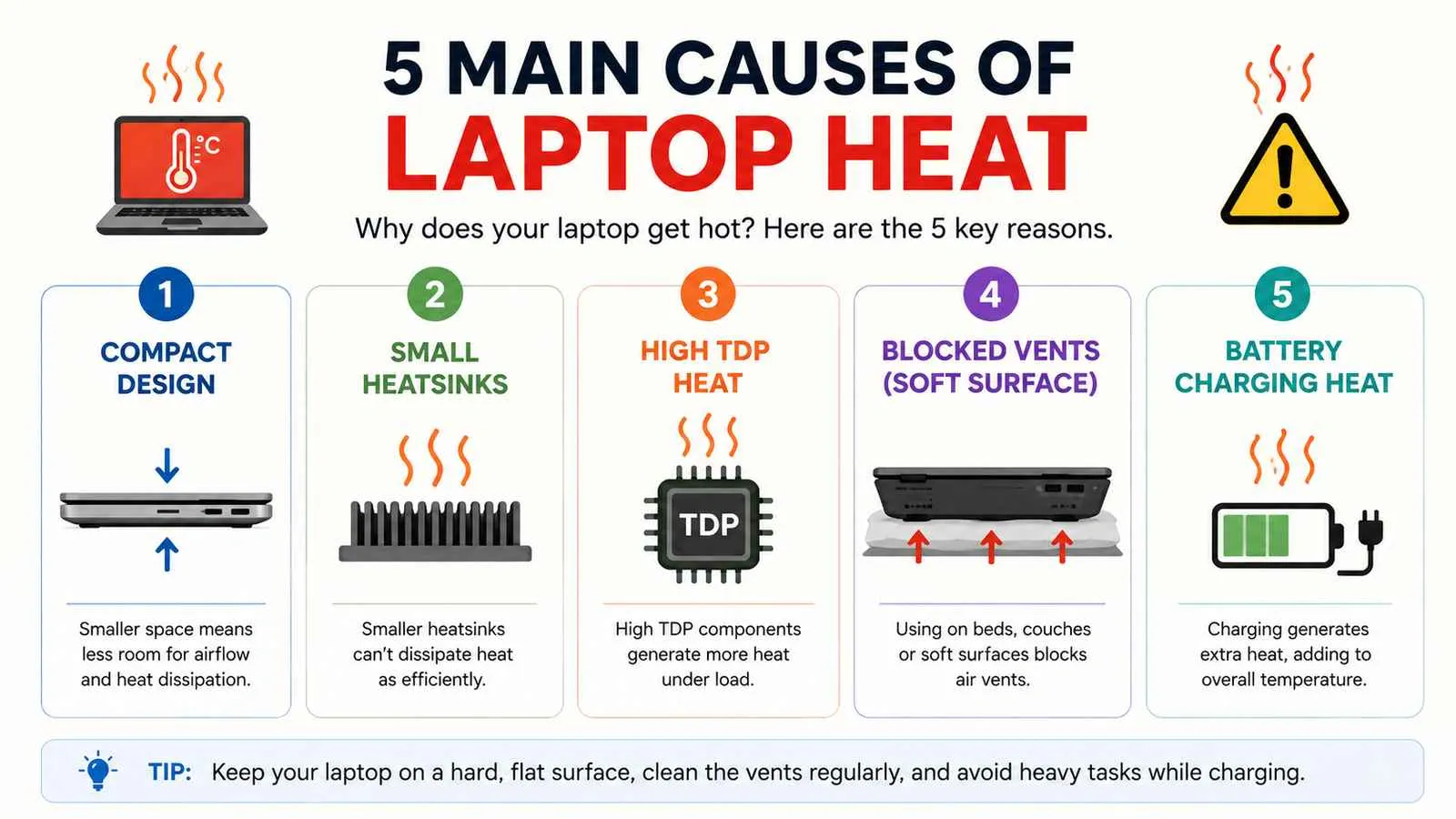
Compact Design with Restricted Airflow
Everything is crammed together. The CPU and GPU sit centimetres apart. Hot air has very limited escape routes, usually two thin vents on the sides or back. Desktop cases have front intake fans, rear exhaust fans, and side panels that give components room to breathe.
This thermal challenge is even more noticeable in thinner notebooks compared to thicker, higher-performance laptops. If you’re still deciding between the two form factors, our guide on the difference between a laptop and a notebook explains how size and cooling design affect everyday performance.
Smaller Heatsinks and Cooling Pipes
Laptops use thin copper heat pipes and small vapour chambers to move heat away from the processor. Desktops use large tower heatsinks or 240mm to 360mm liquid coolers that dissipate heat far more effectively.
Lower TDP Components But Still Significant Heat
Laptop processors are designed with lower TDP (Thermal Design Power) than desktop CPUs. But modern high-performance laptop chips from Intel and AMD still push 28W to 55W under sustained load, and all that power converts to heat inside a thin chassis.
The Surface You Use it on Matters
Using a laptop on a bed, sofa, or carpet blocks the bottom intake vents completely. This alone can push temperatures up by 10°C to 15°C within minutes. In the UAE where ambient temperatures in summer can exceed 40°C, this makes laptop heat even more pronounced than in cooler climates.
Battery and Charging Heat
When your laptop charges and runs demanding software at the same time, the battery adds its own heat to the equation. Desktop computers do not have this issue.
Do Laptop CPUs Run Hotter Than Desktop CPUs?
Yes, laptop CPUs run significantly hotter than desktop CPUs under the same workload. Desktop processors like the Intel Core i7 or AMD Ryzen 7 have higher TDP ratings but much more efficient cooling, large air towers, or liquid coolers that keep them well under control.
A laptop version of the same chip class runs at lower clock speeds but in a far more thermally constrained environment, which pushes temperatures higher as a percentage of its thermal limit.
Laptop CPU vs Desktop CPU Temperature Comparison
| Scenario | Laptop CPU Temp | Desktop CPU Temp |
|---|---|---|
| Idle (browsing, light tasks) | 40°C – 55°C | 30°C – 45°C |
| Medium load (Office, video calls) | 60°C – 75°C | 45°C – 60°C |
| Heavy load (gaming, video editing) | 75°C – 95°C | 55°C – 75°C |
| Throttling point (sustained load) | 90°C – 100°C | Less common |
Laptop CPUs hit their thermal limits much faster under sustained heavy workloads. When the CPU reaches its maximum safe temperature, usually around 100°C for most Intel and AMD chips. It automatically reduces its clock speed to bring temperatures down. This is called thermal throttling, and it directly reduces performance.
Do Gaming Laptops Run Hotter Than Desktops?
Yes, gaming laptops run significantly hotter than gaming desktops, and hotter than standard laptops too. A gaming laptop packs a high-performance CPU alongside a dedicated GPU like the NVIDIA RTX series inside a chassis that is only slightly larger than a standard notebook. Both components generate serious heat at the same time during gaming sessions.
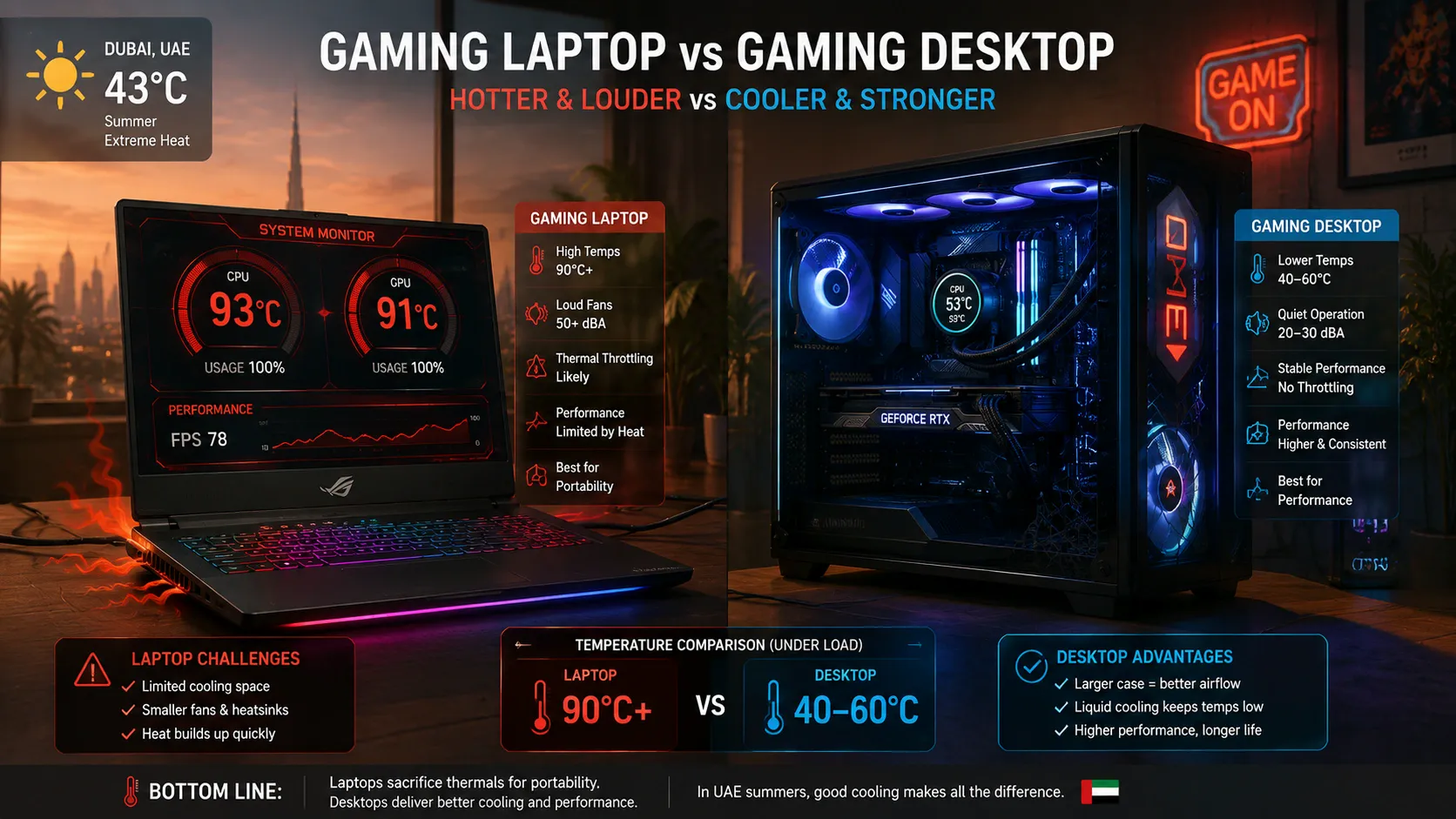
During intense gaming, a gaming laptop CPU and GPU can both reach 85°C to 100°C simultaneously. A gaming desktop with proper airflow typically keeps both components between 60°C and 80°C under the same game load.
Gaming laptops from ASUS ROG, Lenovo Legion, HP OMEN, and MSI all use advanced cooling systems, dual fans, multiple heat pipes, and vapour chambers, specifically to manage this challenge. But physics still wins: the desktop chassis simply has more room to dissipate heat.
What This Means for UAE Gamers
If you game on a laptop in the UAE during summer, the combination of a high-ambient-temperature room and a gaming laptop at full load can push internal temperatures very close to throttling thresholds. Use a cooling pad, game in an air-conditioned room, and keep your laptop elevated to allow airflow underneath.
If you want to understand which gaming laptop brands handle heat the best, our guide on the best laptop brands in the world covers thermal management across HP, ASUS, Lenovo, and Dell with honest pros and cons.
Are Laptops More Energy Efficient Than Desktops?
Yes, laptops are more energy efficient than desktops. A typical laptop uses between 15W and 65W of power during normal use. A mid-range desktop PC uses 150W to 300W, and a gaming desktop with a high-end GPU can draw 400W to 600W or more under load.
This lower power consumption is directly linked to heat. Less power in means less heat generated. It is why laptop CPUs are designed with power efficiency in mind, lower wattage processors produce less heat, which is easier to manage in a small chassis.
However, energy efficiency does not mean laptops run cooler in practice. Because the cooling system in a laptop is so much smaller, even 45W of heat is harder to manage than 150W inside a spacious desktop case with dedicated airflow.
Laptop vs Desktop Energy Use (Approximate)
| Device Type | Idle Power | Heavy Load Power |
|---|---|---|
| Standard laptop | 8W – 20W | 30W – 65W |
| Gaming laptop | 20W – 40W | 80W – 150W |
| Standard desktop | 40W – 80W | 150W – 250W |
| Gaming desktop | 80W – 150W | 300W – 600W+ |
For UAE users paying electricity bills in AED, a laptop costs significantly less to run than a desktop, which is one reason laptops remain popular for everyday use and remote work in the region.
Safe Laptop Temperature Ranges: What Is Normal?
Safe operating temperatures for most laptops fall within these ranges:
CPU Temperature:
- Idle: 35°C – 55°C: Completely normal
- Light use: 50°C – 70°C: Normal
- Heavy load (gaming, editing): 75°C – 90°C: Normal for laptops
- Above 95°C sustained: Thermal throttling risk, investigate the cause
GPU temperature:
- Idle: 30°C – 50°C: Normal
- Under gaming load: 70°C – 88°C: Normal for laptop GPUs
- Above 90°C sustained: Monitor closely, consider a cooling pad
Bottom of the laptop (surface temperature):
- Warm to the touch (35°C – 45°C): Normal
- Hot and uncomfortable to hold (above 50°C): Investigate
Most laptop manufacturers, including HP, Dell, Lenovo, and ASUS, design their laptops to handle up to 100°C on the CPU before throttling kicks in. The components themselves will not be permanently damaged until temperatures exceed safe limits consistently, but sustained high temperatures do shorten the lifespan of thermal paste, battery cells, and in some cases the motherboard over time.
How to Keep Your Laptop Cooler: Practical Fixes That Work
1. Use a Laptop Cooling Pad
A cooling pad with active fans sits under your laptop and pulls cool air upward through the bottom vents. A quality cooling pad can drop internal temperatures by 5°C to 15°C. For gaming laptop users in the UAE, this is not optional — it is essential.
2. Always Use Your Laptop on a Hard, Flat Surface
Never use it on a bed, pillow, or carpet. These materials block the bottom vents entirely. If you need to use it on your lap, use a hardback book or a lap desk underneath.
3. Clean the Vents Every 3 to 6 Months
Use a can of compressed air to blow dust out of the vents. Hold the fans in place with a toothpick while blowing so they do not spin and create back-pressure. Even a thin layer of dust on the heatsink fins significantly reduces cooling efficiency.
4. Change Power Plan to Balanced Mode
Go to Settings > Power & Battery > Power Mode and switch from Best Performance to Balanced. This reduces CPU voltage slightly without affecting most everyday tasks, and it drops temperatures noticeably.
5. Replace Thermal Paste on Older Laptops
If your laptop is 2 to 3 years old and suddenly runs much hotter than it used to, dried thermal paste is likely the cause. This is a service job. If you are in the UAE, Tech Point Zone can advise on where to get this done properly for your brand and model.
6. Keep Your Room Cool
In the UAE, this matters more than anywhere else. A room at 38°C versus a room at 22°C can mean a difference of 10°C or more in your laptop’s operating temperature. If you work from home in summer, keeping the AC running while using a demanding laptop is not a luxury, it directly protects your hardware.
7. Close Unused Browser Tabs and Background Apps
Each open browser tab and background application uses CPU cycles and generates heat. Close what you do not need. Check Task Manager regularly to identify anything running at high CPU usage without a good reason.
8. Upgrade the Back of the Laptop
Even a small stand or a folded cloth that tilts the laptop a few centimetres raises the bottom off the surface and dramatically improves airflow. Many laptop stands are available in the UAE for under AED 50 and make a noticeable difference.
If your laptop’s battery is draining unusually fast alongside overheating, the two issues are often related. Read our guide on how to fix laptop battery draining fast for step-by-step fixes that work on all major brands.
Does Laptop Heat Affect Performance?
Yes, directly. When a laptop CPU reaches its thermal limit, typically around 90°C to 100°C, it reduces its clock speed automatically to bring temperatures down. This is called thermal throttling, and it means your laptop runs noticeably slower during the exact moments when you need it most: gaming sessions, video exports, and large file transfers.
You can check if your laptop is throttling by using free tools like HWiNFO64 or ThrottleStop on Windows. If your CPU clock speed drops below its base frequency during heavy load, thermal throttling is happening.
Desktops almost never throttle under normal use because their cooling systems have enough headroom to manage sustained loads without hitting thermal limits.
For tasks like screen recording and live streaming, which push both CPU and GPU hard simultaneously, thermal management becomes especially important. If you want to record your screen while keeping temperatures reasonable, check out how to screen record on HP laptop for tips on doing this efficiently without overloading your system.
Heat also affects battery health – see how long a laptop battery should last. For a real-world example of how a thin gaming laptop handles heat, read our ASUS ROG Zephyrus G16 review.
Frequently Asked Questions
Do laptops normally run hot?
Yes, it is completely normal for a laptop to feel warm during use. Under light tasks like browsing or video calls, temperatures between 50°C and 70°C are expected. During gaming or video editing, 75°C to 90°C is normal. What is not normal is sustained temperatures above 95°C, constant maximum fan speed during light tasks, or unexpected shutdowns.
Do laptops run slower when hot?
Yes. When a laptop CPU exceeds its safe temperature threshold, usually around 90°C to 100°C, it automatically reduces its clock speed to bring temperatures down. This is called thermal throttling. You will notice it as sudden slowdowns, lag during gaming, or slower video exports. Keeping your laptop cool prevents throttling and maintains full performance.
Is 80°C too hot for a CPU laptop?
No, 80°C is not too hot for a laptop CPU. Most laptop processors are designed to operate safely up to 95°C to 100°C. Hitting 80°C during gaming or video editing is normal and within safe limits. If your laptop reaches 80°C during idle or very light tasks like web browsing, that is worth investigating, clean the vents and check for background processes using high CPU.
Conclusion
Laptops run hotter than desktops. That is simply a result of fitting powerful hardware into a thin, compact body with limited airflow. In the UAE, where ambient temperatures are already high, laptop heat is something every laptop owner should understand and manage actively. For most everyday tasks, your laptop handles heat just fine. For gaming, video editing, or sustained heavy workloads, a cooling pad, clean vents, and an air-conditioned room make a real difference. At Tech Point Zone, we see overheating as one of the most preventable laptop problems, and now you have everything you need to stay ahead of it.